
Giving
Generosity with our time and treasures is often the greatest barometer of our spiritual journey. We have found the Biblical practice and mandate of tithing is the greatest step we can take in the characteristic of generosity.
This way to give online asks for your phone number. A verification code will be sent to you each time you login. Your giving will then be linked to your phone number (which becomes your username). Once logged in you will be able to select your campus, frequency of gift and amount.
The Text to Give link will only work on a mobile device.
See below for Text to Give instructions.
Text GIVE to
(615) 933-2800
*This is LifePoint’s Unique Giving Number in order to receive your gift.
**Text to Give is only available in the United States.
International givers can give through one of the additional ways listed below.
Text to Give Instructions
To securely make a gift, text GIVE to (615) 933-2800 or by clicking the “Text to Give” button above. You’ll be asked to register with a bank account/routing number (ACH) or credit/debit card your first time. After you setup your account, simply text your gift amount for all future gifts (For example: "$100" or “250.00"). Don’t forget to save the number in your phone. You can always text EDIT to update your information, set up a recurring gift and check the status of a gift.
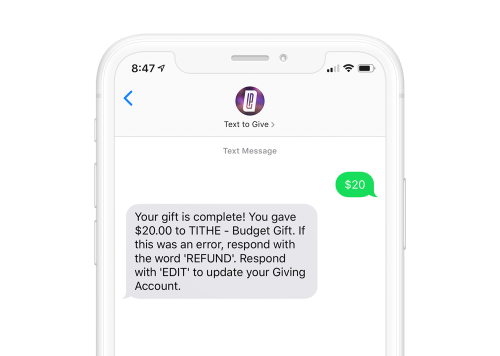
Request a Refund
If you make a mistake, text REFUND to (615) 933-2800 to cancel your last gift amount. You must text REFUND within 15 minutes to refund the gift.
Edit your Giving
Update your information, switch payment sources and view your giving history by texting EDIT to (615) 933-2800.
Additional Ways to Give
Use these if giving to missionaries.
Set up a recurring gift by using your bank account information. If you currently give through EFT and would like to begin giving via text, please email Jennifer Frazier regarding your switch.
Give via Bank Online
Bill Pay Service
Log into your bank account and navigate to its online bill pay feature. Then you setup LifePoint Church as a person (not a company) and authorize your bank to send donations on your behalf. LifePoint Church address is 506 Legacy Drive Smyrna, TN 37167. The phone is 615-459-3311. After the church is setup you can choose a one-time or recurring gift under the AutoPay link. In the memo line box, please add a description of what the gift is for.
On-Campus
Cash and checks can be placed in the baskets or in the Giving Boxes located by the Auditorium.
Through the Mail
If you wish to mail in your giving, please send to:
LifePoint Church
Attn: Financial Office
506 Legacy Dr
Smyrna, TN 37167
Have more questions or having trouble?
Call us at (615) 459-3311, or email Jennifer Frazier. We are here to help.